Blank Labels Digi Stamps Transparent PNG: A Practical Evaluation
Digital scrapbooking and mixed media crafting have evolved significantly with the advent of high-quality digital assets. Among these resources, the Blank Labels Digi Stamps Transparent PNG collection has emerged as a versatile tool for creators seeking to enhance their projects without the need for physical materials. This article provides an objective analysis of what this digital pack offers, who it serves best, and how it fits into a broader crafting workflow. By examining the technical specifications, file compatibility, and practical applications, readers can determine if this specific resource aligns with their creative goals.
Understanding the Product Composition
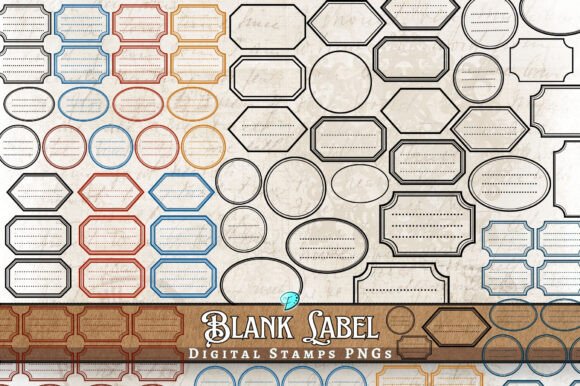
The core value of the Blank Labels Digi Stamps Transparent PNG lies in its comprehensive file structure designed for flexibility. The package is not merely a single image but a curated set containing 28 individual PNG files. These files are provided in various sizes, all rendered at 300dpi (dots per inch). In the context of digital design, 300dpi is the industry standard for print quality, ensuring that when these images are output on paper, they retain sharpness and clarity rather than appearing pixelated or blurry.
Furthermore, the pack includes seven transparent printable sheets formatted specifically for standard US letter size (8.5 x 11 inches). This dual approach—offering both individual cut-out elements and full-page layouts—caters to different working styles. Creators who prefer to assemble projects piece by piece will utilize the individual stamps, while those who wish to print entire pages for cutting later will find the printable sheets more efficient. The transparency of the background in these PNG files is a critical feature, allowing users to overlay these labels onto any colored paper, photograph, or digital background without unsightly white boxes obscuring the underlying texture.
Primary Applications and Use Cases
The versatility of blank label designs makes them suitable for a wide array of craft projects. Because the labels are unadorned, they serve as excellent placeholders for personalization. Users can add handwritten notes, typed text, or other decorative elements directly onto the printed labels before adhering them to their projects.
- Junk Journals: In the creation of junk journals, ephemera is essential. These digital stamps function perfectly as vintage-style tags, inventory lists, or shipping labels that add narrative depth to a journal page.
- Scrapbooking and Card Making: For traditional paper crafts, these labels provide a clean aesthetic. They can be used to date photos, categorize memories, or create focal points on greeting cards.
- Envelopes and Packaging: The 8.5 x 11" printable sheets allow crafters to produce custom envelopes or gift tags efficiently. The transparency ensures that the ink does not bleed over the edges when printed on patterned cardstock.
- Digital Backgrounds: Designers working in software like Photoshop or Canva can use the transparent PNGs to layer textures, creating complex backgrounds for invitations or social media graphics.
The artistic style of these files often reflects a blend of hand-drawn illustrations, mixed media techniques, and found imagery. This eclectic mix appeals to creators looking for a look that feels organic and textured rather than sterile or overly vectorized.
Technical Considerations and File Compatibility
When evaluating digital downloads, file compatibility is a frequent point of confusion. The Blank Labels Digi Stamps Transparent PNG zip file includes metadata files generated by MacOSX systems. It is important for Windows users to understand that files beginning with an underscore and a period (._) are not missing content; they are system-specific metadata files created during the zipping process on a Mac.
If a user opens the zip file on a Windows machine and sees these files, they may mistakenly believe the product is incomplete. However, these files do not affect the integrity of the actual PNG images. The recommendation for Windows users is to simply ignore or delete these metadata files after extracting the main content. Conversely, Mac users may find these files helpful for maintaining file attributes. Regardless of the operating system, verifying the contents against the product description is a prudent step. Ensuring that the 28 individual PNGs and the 7 printable sheets are present confirms that the download was successful.
Benefits and Tradeoffs
Adopting digital stamps like the Blank Labels Digi Stamps Transparent PNG offers several distinct advantages. The primary benefit is efficiency. Unlike physical stamp sets that require ink pads, cleaning, and storage space, digital files are ready to use immediately upon download. There is no risk of ink drying out or stamps becoming damaged over time. Additionally, the ability to resize elements within reason (up to the limits of the 300dpi resolution) allows for greater layout flexibility compared to fixed-size rubber stamps.
However, there are tradeoffs to consider. Digital products require a printer capable of handling the desired paper weight and a computer to manage the files. For crafters who prefer the tactile experience of pressing a physical stamp into paper, the digital alternative lacks the same sensory feedback. Furthermore, the final output quality depends heavily on the user's printer settings and paper choice. A high-resolution file will still look poor if printed on low-quality paper or with misaligned printer heads.
Evaluating Fit for Your Needs
Determining whether this specific pack is the right choice depends on the nature of your current projects. If you are creating a series of junk journals or a large batch of wedding invitations where consistency is key, the uniformity of the digital files is a strong asset. The inclusion of both individual elements and full sheets supports workflows ranging from quick embellishments to bulk printing.
Conversely, alternatives may be worth considering if your project requires highly specific customization that goes beyond simple text addition. If you need labels with unique shapes or colors that cannot be achieved through post-printing coloring or layering, a custom vector illustration service might be more appropriate. Similarly, if you work exclusively with digital tools and never intend to print, ensure that the resolution and aspect ratios of the PNGs meet your screen-based design requirements.
Decision-Making Insights
Before purchasing or downloading the Blank Labels Digi Stamps Transparent PNG, potential users should assess their technical setup. Ensure your computer can handle zip files and that you have a clear understanding of how to manage Mac-generated metadata if you are on Windows. Review the sample images provided in the store listing to confirm that the artistic style—blending hand-drawn and generated elements—matches the aesthetic of your existing projects.
Finally, consider the volume of work you plan to undertake. For one-off projects, the cost and effort of setting up a digital workflow might outweigh the benefits. However, for ongoing creative endeavors involving scrapbooking, card making, or journaling, the reusability and organization of these digital assets offer long-term value. By carefully weighing these factors, crafters can make an informed decision that enhances their creative process without unnecessary complications.